
Tesla Model S: Link - Sway Bar - Front - LH (Remove and Replace)
Tesla Model S (2012-2026) Service Manual / Suspension / Link - Sway Bar - Front - LH (Remove and Replace)
Warning: If the vehicle has air suspension, activate "Jack" mode on the touchscreen before raising and supporting the vehicle. Removal
- Loosen the front LH lug nuts (torque 175 Nm).
- Raise and support the vehicle (refer to procedure)
- Remove road wheel (refer to procedure)
- Remove and discard the nut securing link to knuckle (torque 70 Nm). Caution: To prevent ball joint damage, always hold the ball joint pin with a wrench while loosening or tightening the lock nut.
- Remove and discard nut securing link to sway bar (torque 70 Nm).
Caution: To prevent ball joint damage, always hold the ball joint pin with a wrench while loosening or tightening the lock nut.
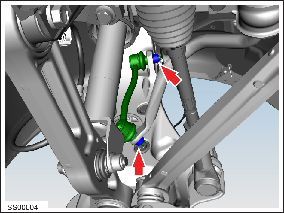
- Remove sway bar link.
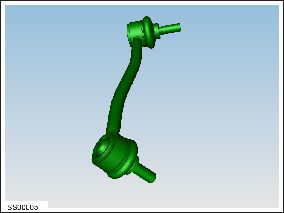
Installation procedure is the reverse of removal.
Caution: Replace all nylon-insert locknuts.
READ NEXT:
 Sway Bar - Front (RWD) (Remove and Replace)
Warning: If the vehicle has air suspension, activate "Jack"
mode on the touchscreen before raising and supporting the vehicle.
Removal
Remove the underhood storage unit (refer to
Sway Bar - Front (Dual Motor) (Remove and Replace)
Warning: If the vehicle has air suspension, activate "Jack"
mode on the touchscreen before raising and supporting the vehicle.
Warning: If the 12V power supply is disconnected, do
not att
Control Arm - Upper - Front - LH (Remove and Replace)
Warning: If the vehicle has air suspension, activate "Jack"
mode on the touchscreen before raising and supporting the vehicle.
Removal
Position the vehicle in preparation for raising
SEE MORE:
Sentry Mode - View Live Camera
NOTE: View Live Camera requires premium connectivity.
It also requires that version 4.2.1 (or newer) of the Tesla
mobile app is installed on a phone that has been paired
as a key to Model S.
When Sentry Mode is enabled, you can use the mobile
app to remotely view the area surrounding Model S as
Unable to charge with Mobile Connector
Inadequate outlet grounding - Try another outlet
The Mobile Connector has detected that the electrical outlet has insufficient grounding, likely caused by an
inadequate or missing ground connection. This does not indicate an issue with
your Mobile Connector or vehicle, but
instead points to an is
© 2019-2026 Copyright www.tesms.org
