
Tesla Model S: Switch - Window Lift - Front Passenger's (Remove and Replace)
Tesla Model S (2012-2026) Service Manual / Electrical / Switch - Window Lift - Front Passenger's (Remove and Replace)
Removal
- Remove passenger door trim. Removal of passenger door trim is similar to driver's door (refer to procedure)
- Move acoustic pad aside to access door trim.
Caution: Take care not to damage component(s).
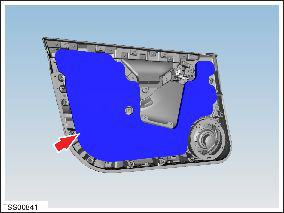
- Remove screw securing window lift switch to door trim.
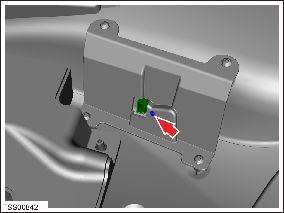
- Release switch from bracket and remove from door trim.
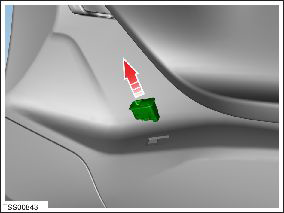
Installation procedure is the reverse of removal.
READ NEXT:
 Switch - Window Lift - LH - Rear (Remove and Replace)
Removal
Remove LH rear door panel (refer to procedure)
Move acoustic pad aside to access door trim.
Caution: Take care not to damage component(s).
Switches - Steering Wheel (Remove and Replace)
Removal
Remove the driver's air bag Air bag - Driver's (Remove and
Replace).
Place the driver's air bag assembly on a soft clean surface with
the backside of the bezel facing up.
Front Reading (Dome) Lights (Remove and Replace)
Removal and Install
Use a trim stick to remove the front dome light bezels. Discard
the bezels.
Release the screw cover fr
SEE MORE:
Heater - PTC (Dual Motor) (RHD) (Remove and Replace)
Warning: Only technicians who have been trained in High
Voltage Awareness are permitted to perform this procedure. Proper
personal protective equipment (PPE) and insulating HV gloves with a
minimum rating of class 00 (500V) must be worn any time a high
voltage cable is handled. Refer
Lamp - Fog - Front - LH (Remove and Replace)
Removal
Remove the front fascia (refer to procedure).
Release the clips (x4) that secure the fascia harness to the fog
lamp assembly.
Disconnect the fog lamp harness connector.
Remove the screws (x3) and bolt th
© 2019-2026 Copyright www.tesms.org
