
Tesla Model S: Panel - Aero Shield - Front (Remove and Replace)
Tesla Model S (2012-2026) Service Manual / Exterior fittings / Panel - Aero Shield - Front (Remove and Replace)
Warning: If the vehicle has air suspension, activate "Jack" mode on the touchscreen before raising and supporting the vehicle.
Removal
- Raise and support the vehicle (refer to procedure). Warning: Do not work on an incorrectly supported vehicle.
- Remove the plastic rivets (x12, x14, or x15) that secure the
undershield to the chin spoiler and subframe.
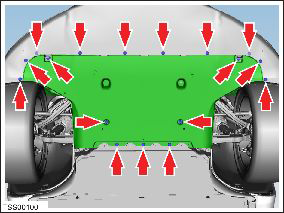
Note: Vehicles with the underbody shield installed do not have the 3 rivets that secure the rear of the front aeroshield. However, there are 2 additional plastic rivets that need to be removed.
Note: Vehicles with a composite front carrier have bolts (x2) that secure the front corners of the aeroshield (torque 4 Nm).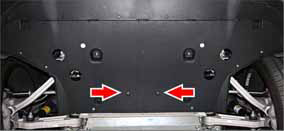
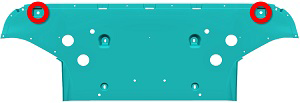
- Reposition the front fascia LH lower edge and remove the plastic rivet that secures the undershield to the subframe.
- Repeat the previous step and remove the RH plastic rivet.
- Remove the bolts (x4) that secure the front undershield to the
body (torque 3 Nm).
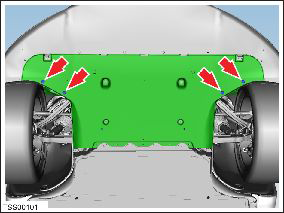
- Remove the bolts (x4) that secure the front undershield to the
body (torque 4 Nm).
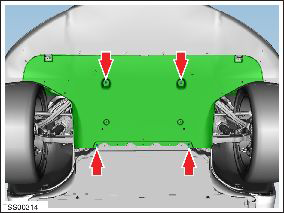
- Carefully release the undershield from the chin spoiler lip fixings (x3) and remove the undershield.
Installation procedure is the reverse of removal.
READ NEXT:
 Panel - Aero Shield - Mid (Remove and Replace)
Removal
Remove the LH diffuser tray rails (refer to procedure).
Repeat step 1 for the RH diffuser tray rails.
Remove the bolts (x9) that secure the mid aero shield panel to
the bo
Panel - Diffuser Tray - Rear (Remove and Replace)
Removal
Remove rear fascia assembly (refer to procedure)
Remove bolts (x6) and plastic rivets (x2) securing rear diffuser
to rear fascia and applique (torque 3 Nm).
Rails - Diffuser Tray Rear - LH (Remove and Replace)
Warning: If the vehicle has air suspension, activate "Jack"
mode on the touchscreen before raising and supporting the vehicle.
Removal
Raise and support the vehicle (refer to pro
SEE MORE:
Headlight Assembly - LH (Remove and Replace)
Removal
Remove front fascia for access (refer to procedure)
Disconnect headlight connectors (x2).
Remove bolts (x4) securing headlight to carrier and fender
(torque 4 Nm).
Note: LH wheel arch lin
Charge rate reduced - Unexpected voltage drop
Remove extension cords / Have wiring inspected
Charging speed has been reduced because the onboard charger in your vehicle
has detected a large voltage drop
during charging.
Likely causes of this issue include:
Problems with the building wiring and/or the wall outlet.
An extension cord or othe
© 2019-2026 Copyright www.tesms.org
