
Tesla Model S: Buckle Assembly - 3rd Row - LH (Remove and Replace)
Tesla Model S (2012-2026) Service Manual / Safety and Restraint / Buckle Assembly - 3rd Row - LH (Remove and Replace)
Warning: Prior to disconnection of 12 volt power supply, ensure driver's door glass is in the fully open position. Failure to follow this instruction could result in vehicle lockout.
Warning: If 12 volt power supply is disconnected, do not attempt to open any doors with door glass in closed position. Failure to follow this instruction could result in door glass shatter.
Removal
- Raise 3rd row seats if folded into trunk well.
- Position seat belt aside for access to the bolt.
- Remove bolt securing 3rd row seat belt buckle to body (torque 40 Nm).
- De- Latch buckle from seat belt and remove buckle from vehicle.
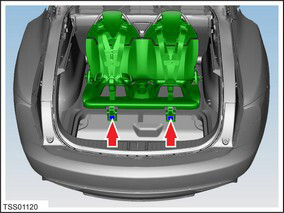
- Inspect belt webbing for wear and tear, if buckle or webbing show signs of damage replace component.
Installation procedure is the reverse of removal.
READ NEXT:
 Pre-Tensioner - Outboard Lap - 1st Row - LH (Remove and Replace)
Removal
Disconnect 12V power.
Rear wheel drive (RWD): Refer to
procedure.
Dual Motor: Refer to procedure.
Use a trim tool to carefully relea
Pyrotechnic Fuse (Remove and Replace)
Warning: Prior to disconnection of 12 volt power supply,
ensure driver's door glass is in the fully open position. Failure to
follow this instruction could result in vehicle lockout.
Warni
Sensor - Intrusion - Door - Front (Remove and Replace)
Removal
Remove door trim panel (refer to procedure)
Remove screws (x2) securing impact sensor to door (torque 5 Nm).
Disconnect sensor harness connection.
SEE MORE:
Rear Reading Lights
Model S is equipped with a reading light on each side of
the rear seats, located above the door and next to the
coat hangers (see Coat Hangers ). To turn a
reading light on or off, press its lens. If you leave a
reading light turned on, it automatically turns off when
Model S powers off.
Headli
Module - HVAC Controller - RCCM (Remove and Replace)
Removal
Remove the IP carrier (refer to procedure).
Disconnect the HVAC harness connector from the Remote Climate
Control Module (RCCM).
Remove the screws (x4) that secure the RCCM to the HVAC casing.
Remove the
© 2019-2026 Copyright www.tesms.org
