
Tesla Model S: Bumper Assembly - Rear (Remove and Replace)
Tesla Model S (2012-2026) Service Manual / Body / Bumper Assembly - Rear (Remove and Replace)
Removal
- Remove the rear fascia assembly for access (refer to procedure).
- Remove the bolts (x8) that secure the bumper to the body (torque
52 Nm).
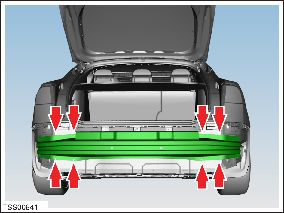
- Remove the rear bumper assembly.
Installation procedure is the reverse of removal.
READ NEXT:
 Diffuser Trim - Rear (Remove and Replace)
Removal
Remove rear diffuser (refer to procedure)
Remove plastic rivets (x2) and screw (x1) securing diffuser trim
to applique (torque 3 Nm).
Carrier - Bumper - Front (Remove and Replace)
Warning: If the vehicle has air suspension, activate "Jack"
mode on the touchscreen before raising and supporting the vehicle.
Removal
Recover refrigerant from the vehicle (refer
Strut - Shock Tower to Bulkhead - LH (Remove and Replace)
Removal
Ensure that the wipers are in the off position by rotating the
end of the left-hand steering column lever towards the rear of the
vehicle.
Open the hood to the service pos
SEE MORE:
Disconnect 12V Power (Dual Motor)
Warning: If the 12V power supply is disconnected, do
not attempt to open any doors with door glass in closed position.
Failure to follow this instruction could result in door glass
shatter.
Note: Before disconnecting the 12V power supply,
ensure that the driver's door window is
Horn - 1st Generation (Remove and Replace)
Removal
Remove the front underhood apron (refer to procedure).
Remove the bolt that secures the horn to the bracket (torque 8
Nm).
Move the connector covers aside and disconnect the horn
connectors (x2).
Rem
© 2019-2026 Copyright www.tesms.org
