
Tesla Model S: Control Arm Assembly - Rear - Lower - LH (Remove and Replace)
Tesla Model S (2012-2026) Service Manual / Suspension / Control Arm Assembly - Rear - Lower - LH (Remove and Replace)
Warning: If the vehicle has air suspension, activate "Jack" mode on the touchscreen before raising and supporting the vehicle.
Removal
- Loosen the front LH lug nuts.
- Raise and support the vehicle (refer to procedure)
- Remove road wheel (refer to procedure)
- Remove mid aero shield (refer to procedure)
- Remove nut and bolt securing lower control arm to integral link (torque 130 Nm).
- Remove nut securing sway bar link to lower control arm (torque 70 Nm). Caution: To prevent ball joint damage, always hold the ball joint pin with a wrench while loosening or tightening the lock nut.
- Remove nut and bolt (x2) securing lower control arm to subframe
(torque 115 Nm).
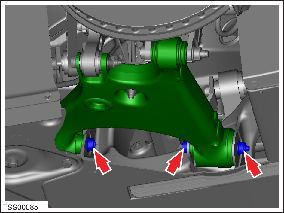
- Support weight of hub and rotor. Caution: Take care not to damage component(s).
- Remove nut and bolt securing lower control arm to knuckle (torque 190 Nm).
- Release arm from suspension knuckle and remove lower control arm.
- Installation procedure is the reverse of removal, except for the following: Note: Clean the affected areas before installation. Caution: Only fully tighten suspension nuts and bolts when the vehicle is on a 4-post lift and the suspension is in the ride height position.
- Transfer vehicle to a 4 post lift (refer to procedure)
- Perform a four wheel alignment check (refer to procedure)
READ NEXT:
 Link - Suspension - Rear - Upper - LH (Remove and Replace)
Warning: If the vehicle has air suspension, activate "Jack"
mode on the touchscreen before raising and supporting the vehicle.
Removal
Remove the wheel (refer to procedure).
Toe Link Assembly - Rear - LH (Remove and Replace)
Warning: If the vehicle has air suspension, activate "Jack"
mode on the touchscreen before raising and supporting the vehicle.
Removal
Raise and support the vehicle (refer to pro
Drop Link - Sway Bar - Rear - LH (Remove and Replace)
Removal
Remove the road wheel (refer to procedure).
Remove the nut that secures the sway bar drop link to the lower
control arm (torque 70 Nm).
Caution: To p
SEE MORE:
Jackshaft Assembly - Front (Remove and Replace)
Warning: If the vehicle has air suspension, activate "Jack"
mode on the touchscreen before raising and supporting the vehicle.
Removal
Remove the RH driveshaft assembly (refer to procedure).
Release the bolts (x2) that secure the jackshaft to the drive
unit (torque 30 Nm).
Module - Sunroof Controller (Remove and Replace)
Removal
Remove the body control module (BCM) (refer to procedure)
Remove the 4 bolts and 1 nut that secure the sunroof controller
mounting bracket to the body (torque 8 Nm).
Carefully turn the mounting bracket over.
© 2019-2026 Copyright www.tesms.org
