
Tesla Model S: Pipe - Low Pressure - Chiller (Remove and Replace)
Tesla Model S (2012-2026) Service Manual / Thermal Management / Pipe - Low Pressure - Chiller (Remove and Replace)
Removal
- Recover refrigerant from the vehicle (refer to procedure)
- Remove front skid plate (refer to procedure)
- Remove nut (x1) securing pipe retaining plate to chiller TXV
(torque 12 Nm).
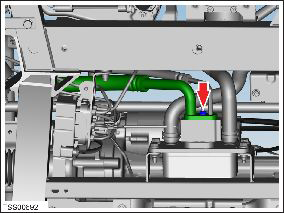
- Disconnect refrigerant pipes from TXV. Caution: Plug pipe connections to prevent ingress of moisture or dirt. Caution: Remove and discard O-rings.
- Remove underhood storage unit (refer to procedure)
- Remove bolt securing chiller low pressure pipe at union to low
pressure charge port pipe (torque 8 Nm).
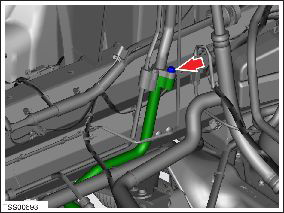
- Maneuver and remove pipe.
Caution: Plug pipe connections to prevent ingress of moisture or dirt.
Caution: Remove and discard O-rings.
Installation- Installation procedure is the reverse of removal, except for the following:
- Replace A/C pipe O-rings.
Caution: Lubricate new O-rings with clean refrigerant oil.
READ NEXT:
 TXV Valve - Evaporator (Remove and Replace)
Removal
Recover refrigerant from the vehicle (refer to procedure)
Remove underhood storage unit (refer to procedure)
Remove nut securing pipe retaining plate to evaporator TXV
(to
TXV Valve - Chiller (Remove and Replace)
Removal
Recover refrigerant from the vehicle (refer to procedure).
Remove the front skid plate (refer to procedure).
Remove the nut that secures the pipe retaining plate to the TXV
Pressure Transducer - Low Pressure (Remove and Replace)
Removal
Recover refrigerant from the vehicle (refer to procedure).
Remove the underhood storage unit (refer to procedure).
Disconnect the electrical connector from the pressure
tr
SEE MORE:
Wind Deflector (Remove and Replace)
Removal
Remove the LH and RH wind deflector arms
(refer to procedure).
Release the wind deflector from the clips on
the deflector blade.
Removal
Installation procedure is the reverse of removal.
Caution: Ensure that the
Steering Column (Remove and Replace)
Removal
Ensure that the front road wheels are in a straight ahead
position.
Remove the driver's side lower dash trim (refer to procedure).
Remove the steering controller module (refer to procedure).
Disconnect the steering column motor harness connectors (x2).
© 2019-2026 Copyright www.tesms.org
