
Tesla Model S: Pivot Lock - Seat back - 2nd Row Seat - LH (Remove and Replace)
Tesla Model S (2012-2026) Service Manual / Seats / Pivot Lock - Seat back - 2nd Row Seat - LH (Remove and Replace)
Removal
- Remove LH rear seat back rest assembly (refer to procedure)
- Remove E-clip securing pivot lock.
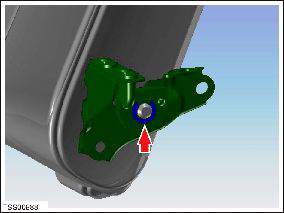
- Slide pivot lock from backrest frame.
READ NEXT:
 Pivot Lock - Seat back - 2nd Row Seat - RH (Remove and Replace)
Removal
Remove rear seat back rest assembly (refer to procedure)
Remove E-clip securing pivot lock.
Slide pivot lock fr
Pivot Sleeve - Seat back - 2nd Row Seat - LH (Remove and Replace)
Removal
Remove Rear LH seat back rest assembly (refer to procedure)
Spread nose of pivot sleeve and remove from LH seat backrest.
SEE MORE:
Power grid or vehicle issue limiting AC charging
Unplug and retry / Try different charging location
Charging speed has been reduced due to a condition that affects your
vehicle's ability to charge with AC power. DC
fast charging / Supercharging should still function as expected.
This condition could occur due to power supply disturbances caused
Integral Link - Rear - LH (Remove and Replace)
Warning: If the vehicle has air suspension, activate "Jack"
mode on the touchscreen before raising and supporting the vehicle.
Removal
Remove road wheel (refer to procedure)
Remove nut and bolt securing link to suspension knuckle (torque
130 Nm).
Remove nut and bolt
© 2019-2026 Copyright www.tesms.org
