
Tesla Model S: Pull Onto Flatbed Truck From Rear (Using Tow Eye)
NOTE: If Model S has no low voltage power, you need an external low voltage power supply to open the hood or use the touchscreen. See If Vehicle Has No Power.
NOTE: Vehicles equipped with a hitch receiver cannot be pulled from the rear tow eye. Use the tow bar or hitch receiver only to pull the vehicle to a safe location, such as onto a flatbed truck. Do not transport the vehicle with wheels on the ground.
CAUTION: To avoid damage, only pull the vehicle onto a flatbed truck using a properly-installed tow eye. Using the chassis, frame, or suspension components to pull the vehicle can result in damage.
1. Locate the tow eye. The tow eye is located in the front trunk.
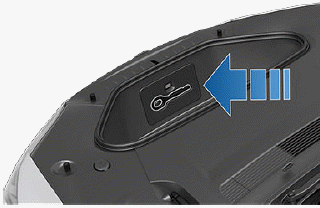
2. Release the rear tow eye cover by pressing firmly on its bottom perimeter until it pivots inward, then gently pulling the raised section toward you.
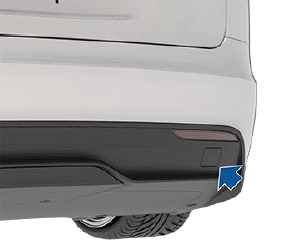
3. Fully insert the tow eye into the opening, then turn it counter-clockwise until securely fastened.
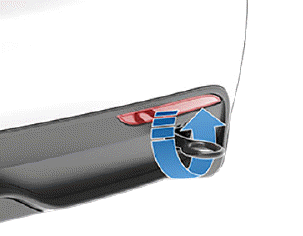
4. Attach the winch cable to the tow eye.
- CAUTION: Before pulling, make sure the tow eye is securely tightened.
5. Activate Transport Mode.
6. Pull Model S slowly onto the flatbed truck.
READ NEXT:
 Pull onto the Flatbed Truck From
Front (Without Tow Eye)
Pull onto the Flatbed Truck From
Front (Without Tow Eye)
CAUTION: To avoid damage, only pull the vehicle
onto a flatbed truck using a properly-installed tow
eye. Using the chassis, frame, or suspension
components to pull the vehicle can result in
If Vehicle Has No Power
If Model S has no low voltage power, perform the
following steps to open the hood or jump start the
auxiliary low voltage battery.
Jump Starting the Low Voltage Battery
CAUTION: Model S cannot be us
SEE MORE:
Striker - Hood (Remove and Replace)
Removal
Open the hood for access.
If the vehicle is rear wheel drive (RWD), remove the clips (x6)
that secure the acoustic panel to the hood and carefully peel back
the acoustic panel for access.
Mark the instal
Plugging In
If desired, use the touchscreen to change the charge
limit and the charging current (see Charge Settings).
To charge at a public charging station, plug the
appropriate adapter into the vehicle's charging port, and
then connect the station's charging connector to the
adapter. The most commonly u
