
Tesla Model S: Steering Rack (RWD) (Remove and Replace) - Installation
Tesla Model S (2012-2026) Service Manual / Steering / Steering Rack (RWD) (Remove and Replace) / Steering Rack (RWD) (Remove and Replace) - Installation
Installation
- Installation procedure is the reverse of removal, except for the following: Caution: Replace all nylon-insert locknuts. Caution: Replace all Patchbolt(s). Note: The LH and RH subframe braces are not interchangeable.
- Remove the protective caps from the tie rods of the new steering rack to ensure that there is no damage to the threads, then reinstall the protective caps.
- Turn the input shaft of the new steering rack completely clockwise.
- If the tie rod end positions were paint-marked earlier, transfer the paint marks to the new steering rack.
- Reinstall the steering rack.
- Install the subframe braces from the underhood area, but do not install the mounting bolts yet.
- Raise the vehicle.
- Confirm the proper position of the subframe braces. The rear
portion of the brace is positioned between the subframe and side
rail, and the front portion is positioned between the bolt head and
the sway bar bracket.
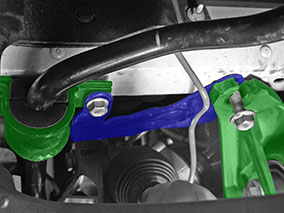
- Loosely install the sway bar bolts and rear subframe bolts.
- Install the upper bolts (x2) that secure the LH and RH subframe
braces to the subframe (torque 26 Nm).
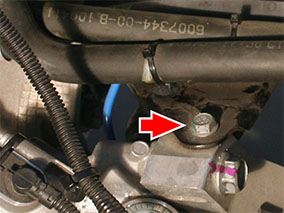
- Fully tighten the sway bar bolts and rear subframe bolts.
- Install the tie rod ends using the same number of turns that were recorded during removal.
- Ensure that the front road wheels are in a straight ahead position before reconnecting the lower intermediate shaft.
- Transfer the vehicle to a 4 post lift (refer to procedure).
- Perform a wheel alignment check (refer to procedure).
- Perform a full firmware update.
- Run the "Power Steering (EPAS) Control" procedure in Toolbox.
Note: After recalibrating the power steering, drive the vehicle for a minimum of 5 minutes before returning the vehicle to the customer.
READ NEXT:
 Steering Rack (Dual Motor) (Remove and Replace)
Warning: If the vehicle has air suspension, activate "Jack"
mode on the touchscreen before raising and supporting the vehicle.
Removal
Remove the front subframe (refer to procedu
Tie Rod End - LH (Remove and Replace)
Warning: If the vehicle has air suspension, activate "Jack"
mode on the touchscreen before raising and supporting the vehicle.
Removal
Remove the road wheel (refer to procedure).
Seal - Steering Rack (Remove and Replace)
Removal
Raise and support the vehicle (refer to procedure).
Warning: Do not work on an incorrectly supported
vehicle.
Remove upper intermediate stee
SEE MORE:
Door Glass - LH - Front - Adjust
Removal
Remove door trim pad (refer to procedure)
Loosen but do not remove clamp nut securing door glass to
regulator (torque 7.5 Nm). This allows glass to move fore and aft.
Caution: Take care not to damage component(s).
Brake Sensor Cluster - ESC (Remove and Replace)
Removal
Remove center console assembly
(refer to procedure)
Disconnect wiring harness connector.
Carefully cut acoustic padding covering ESC
sensor.
Peel back acoustic padding to expose ESC
module.
© 2019-2026 Copyright www.tesms.org
